Category Archives: Product Reviews

LG 84LM9600 Ultra HD TV

This TV is kind of a big deal, and I don’t say that just because it’s six feet wide. The new LG 84LM9600 is the world’s first Ultra HD (formerly known as 4K) 3D smart TV.

LG 84LM9600 Ultra HD TV

Because production quantities are understandably low, and this is a pricy set, it was easier for me to go to the TV rather than for the TV to come to me. I spent several hours alone with the TV and my test gear at LG’s Chicago headquarters.

Ultra HD TVs have a resolution of at least eight million active pixels – 3,840 horizontally and 2,160 vertically in a 16:9 aspect ratio – which is exactly the resolution of this model (as well as the Sony model that is also just hitting the market).

This is LG’s flagship model, so it carries a price of $19,999, though retailers are selling it for a minimum advertised price of $16,999.

The 84LM9600 includes all of LG’s top TV features, including the smart TV platform, the gyroscope-like Magic Remote (with voice features), built-in Wi-Fi and a pretty good audio system. It also comes with a standard remote. It wears an attractive, fairly narrow bezel for a TV of this size and is only a hair over 1.5 inches thick. Sharp’s 80-inch 1080p TV models are more than three inches thick.

That slim depth is a result of LG going with an edge-lit design rather than a full-array LED design, which Sharp uses in its big TVs. Edge-lit LED TVs are thinner, but they can suffer from some light blooming and uniformity issues that don’t plague full-array models.

Like all LG 3D LCD TVs, this one uses passive 3D with polarized glasses (no battery or LCD lenses). The TV comes with six sets of 3D glasses.

The LG Ultra HD comes with a small, but very sturdy-looking table stand that permits it to swivel to either side. A swivel stand is unusual in the massive class of TVs, and this one swivels remarkably well – you’d hardly guess by how easily it moves that the TV weighs 150 pounds (Sharp’s 80- and 90-inch TVs actually weight just a bit less than this).

Another issue with edge-lit TVs is their inability to locally dim the LEDs nearly as well as full-array sets. LG and other companies do employ an edge-based local dimming technology, and I’ll discuss that a little later. Again, for comparison, the big Sharp TVs do not use local dimming, but the Sharp Elite brand TVs do. (Note: I use the Sharp 80- and 90-inch TVs as a reference only because they are the closest comparable in size. Being 1080p TVs, they are considerably cheaper, but also a different technology class).

Big TVs are fun – who doesn’t love a TV that makes the neighbors’ jaw drop? But arranging a room around a TV this big raises particular issues, especially seating distance. Using the THX seating distance formula (diagonal screen size divided by .84) gives us an ideal seating distance of 8.3 feet. That might seem a bit close, especially if you’re using a 1080p TV, but with Ultra HD resolution, you can actually sit much closer (the THX calculator is for determining an immersive viewing field, and does not necessarily take screen resolution into account).  Most living rooms will put a little more distance between the TV and the sofa, so I set myself up at 10 feet.

Basic Calibration

I started off digging into the TV’s menu and doing a basic calibration. The TV has a variety of pre-set video modes, including a Cinema mode that came very close to the final value after my own calibration. It also includes a feature called Picture Wizard II, which guides you through a set of images to help you properly set the TV to your preference. I’ve used it before, and it works well. In addition to the basic controls, LG includes advanced features like Dynamic Contrast, Super Resolution, Color Gamut, MPEG Noise Reduction, Black Level, Dimming Level and TruMotion (a 240Hz refresh rate processor). This set also offers full ISF day/night modes. For some reason the advanced picture settings are divided into two menus: Expert Control and Picture Options. This can make finding the feature you want a little difficult.

After finalizing my settings, I ran through several Blu-ray discs of test patterns. On dark fields I could clearly see some light blooming around the edges from the edge-mounted LEDs. This was most noticeable on the lower right and top left corners. When a bright white element was added to the scene, I could see some light leakage affecting an area around the bright element – I was able to improve that by engaging the local dimming (which seemed to work best on Medium setting). I was told that the set had 16 dimming zones. Light issues are prevalent on every LED LCD TV, especially edge-lit ones, which comprises most of the market. You don’t encounter this on plasma T Vs, but there are no 4K plasma TVs. Among other edge-lit TVs, the blacks on this set mostly looked pretty good. On real content material, the light bleeding was minimal and not enough to be a distraction unless you tend to be fanatical about that kind of thing.

I did see some slight uniformity issues which appeared as barely noticeable bands. The only time I saw this was during very bright scenes in the disc The Art of Flight. I’ve seen this issue before on TVs, and it seems to be associated with edge-lit LEDs. This was not a major issue, and if you weren’t looking for it, you’d probably miss it. On other test patterns, like color, motion and deinterlacing, the TV performed very well.

Best 3D on TV

I switched to some 1080p Blu-ray movies. First up was Tron: LegacyThe scenes in this movie are almost all dark, and the light issues were not apparent accept in the top and bottom black bars of the Cinemascope feature. I watched clips from several other 1080p movies, including The Dark KnightAvatar and The Art of Flight. While the Ultra HD upconversion didn’t necessarily make the 1080p video look any better (it didn’t make it worse), it eliminated any pixel structure unless you were practically leaning on the TV. It’s quite impressive to sit five feet away from a TV that’s six feet wide and still see a perfectly smooth image.

Next I switched to 3D mode. I’ve been a fan of passive 3D because the cheap, lightweight glasses make 3D a little less of a burden than active shutter glasses, but the system has a significant flaw. With 1080p TVs, polarized glasses cut the resolution in half so you end up watching less than high definition. It doesn’t look bad, but the picture isn’t as crisp as the full HD view you get with active shutter glasses.

Ultra HD TVs turn that upside down. With an Ultra HD TV, the passive glasses still cut the resolution in half, but you’re starting with double the resolution (because the TV upscales the 1080p signal). When the glasses divide up the left and right image you’re still getting 1080p in each eye, but without the flicker and irritation sometimes encountered when wearing active shutter glasses.

All of the above was preparation to report that this TV displayed the absolute best 3D I’ve ever seen on a television. I watched segments from a few 3D Blu-ray discs, but IMAX Under the Sea was the most impressive. The image was completely natural and realistic. In one scene a large grouper swims up close to the camera, and I could swear the fish was three inches from my nose. The illusion was that convincing. Other, less dramatic scenes still produced a depth and clarity that was stunning.

After all the 1080p material, which is what most buyers will watch on this set, I switched over to some Ultra HD video LG supplied on a hard-disc server. These clips were mostly landscape shots of attractive cities and towns around the world, and they all looked amazing. From 10 feet the resolution shouldn’t have made much of a difference, but the effect was more subtle than just more pixels – it created the closest thing to looking through a clear window I’ve ever seen. A single 3D Ultra HD clip (this one animated) was also pretty amazing.

What’s Next for Ultra HD?

So is Ultra HD the future of television? Well, maybe, probably. How’s that for a firm answer? There are a couple of ways to look at this. First, Ultra HD is a natural progression from 1080p, and unlike some other TV innovations (3D), it is an actual improvement. More real pixels means more real picture information. But how many pixels are necessary for a given screen size? I honestly don’t think I can answer that for every person, but I can say that on this 84-inch TV, the extra 2,000,000 or so pixels made the picture more realistic, added depth and improved clarity, especially in 3D.

But what about 4K content? Sony is offering buyers of its 84-inch 4K TV a hard-disc server with ten Ultra HD movies, but Sony’s TV also cost $8,000 more than the LG unit. For now, this LG (and all the other Ultra HD TVs that will launch in 2013) will mostly be used for watching the high-definition sources you already have, and this TV does a good job of that.

Remember, TV broadcasters don’t even send out 1080p video. We already watch lots of 480p, 720p and 1080i content on 1080p TVs. An Ultra HD TV just upscales those lower-resolution signals even further to make them more viewable on a very large screen. Having a good built-in video processor and extra resolution improves the visual experience of plus-size TVs and dramatically improves passive 3D.

Runco LightStyle LS-1 Home Theater Projector

There are luxury brands that we all know—Mercedes, Louis Vuitton—and there are luxury brands that are known primarily among aficionado groups—Cohiba cigars, Sage fly fishing rods. Runco tends to be a brand that falls more in the second category. It has a reputation for offering spectacular, and spectacularly expensive, home theater projectors. For instance, at a CEDIA Expo press conference in 2011, the company spent most of the 40 minutes demonstrating a jaw-dropping projector that clocks in at over $200,000. That’s without the screen or the popcorn.

Why do I point this out—because alongside such extravagances, the company now offers a product that will get the Runco name, along with a lot of the Runco prowess, into homes for a lot less.  Last year the company introduced the LightStyle line of projectors which tend to be less expensive than Runco’s other systems (though the three-chip models do get up there). They also don’t don’t look like industrial air conditioners. The LS-1 reviewed here carries an MSRP of $3,999.

Actually, being round and squat, they look a little like Roombas. That’s not a bad thing. These are stylish little projectors (you can also customize them with a color palette or team logo) that won’t look at all bad snugged up against your ceiling.

The LS-1 is a single-chip DLP projector. The company specs rate it as having a 10,000:1 contrast ratio and 780 ANSI lumens brightness. That seems a bit low since other companies offer cheaper models with more than 1,000 lumens, but you’ll see from my testing, that performance wasn’t hindered by that number.

Setting up the Runco, I found that while it’s an entry-level product, it certainly didn’t feel like it when I lifted all 18 pounds of it out of the box. With that kind of heft, either the company packed in some extra sand bags, or it’s got a lot of heavy-duty features making it work.

The second thing I noticed was that the inputs all seemed to be missing. Actually they’re nicely covered by a removable panel. This is one of those features that make the projector look more like something you’d want in your family hang-out room and less like something hanging from the ceiling in a classroom.  Accessing the input panel I found two HDMI ports, 1 component, 1 RGB, s-video and composite plus an RS-232 for control systems.

On top there’s a small control panel for access the menu and such, but you’re much better off depending on the remote for all those operations.

Speaking of the remote—it’s backlit so you can use it in the dark, and it’s logically organized and easy to use.

Runco has being catering to the video enthusiast long enough to know what people expect, so it wasn’t a surprise to find features like ISF day/night settings for calibration, built-in test patterns and Runco’s ViVix processing. All of that shows the projector was designed to be tweaked for a good picture.

Of course, in this case, the projector didn’t need to be tweaked very much. I aimed it at a 106-inch Seymour Screen Excellence screen with a .98 gain. Runco includes a manual vertical lens shift to help you hit the bulls eye—in this case you access the lens shift by lifting up the Runco logo and turning a mechanism with an included allen wrench.  After that, a little adjusting in the picture menu and I was off to watch some video.

First, the projector did an excellent job on test patterns, so I played a few Blu-ray movies. I started with the snow board documentary The Art of Flight. This disc is a beauty, so get it if you don’t already have it. The wide shots of snow-covered peaks against blue skies looked stunning. The picture capture all the depth and variation in the different shades of white to gray you find in snow and ice coupled with the shadows of the mountains.

In one scene a helicopter hovers over the mountain, its blade rotating in slow motion. I expected the spinning of the chopper blades to create artifacts, but there were no jagged edges or mosquito noise anywhere to be seen. In another scene where a brightly-clad snow boarder launches across the screen, his board at a diagonal and nothing but a blue sky behind him, every edge was perfect.

I moved onto footage with more dark scenes, including Avatar and Harry Potter and the Deathly Hallows II. In both movies, the projector created very rich colors with fine detail, and dark scenes also looked good. Blacks were deep and showed detail in shadows, though I’ve seen somewhat better on LCoS projectors in the same price range.

As noted above, this projector is not excessively bright—it’s best great in a dark to moderately dark room. If you want to watch a football game during the day with the lights on, don’t expect the deepest contrast.

Some people shy away from single-chip DLP because of the rainbow effect—an artifact caused by the projector’s color wheel. I’m not terribly sensitive to that anomaly, but I can see it and know how to look for it. On this Runco I did not experience it even once. I tried, but nothing. This is only single-chip projector I’ve seen that, at least for me, exhibited no rainbow effect at all.

Altogether, this is a great, reasonably-priced projector that gives a significant improvement over the bargain projectors in the $1,000-$3,000 range. If I had to nitpick, I’d have to say the lack of 3D might be a turn-off, considering the fact that there are several 3D projectors for about the same price (JVC’s DLA-X30 comes to mind). This unit also seemed a little loud, but most of the time I used it without any accompanying audio (and I was sitting right next to it). In a normal ceiling installation the projector will be farther from the viewers and have a soundtrack to cover any fan noise.

Runco LightStyle LS-5

Runco LightStyle LS-5

The Runco LightStyle LS-5 costs a packet, but its performance with HD is glorious

  • For

    Excellent detail resolution, contrast; comprehensive menus; good connectivity; sensible remote handset

  • Against

    On paper and physically cheaper rivals seem to offer as much or more

By Runco‘s usual standards, the LightStyle LS-5 is something of a budget product.

The LS-5’s lowly status (in Runco’s range) is reflected in the relative lack of luxury features and fairly basic spec. It’s a Full HD single chip DLP projector with a six-segment colour wheel.

We usually see motorised focus at this kind of price level and some kind of easy way to lens shift. That’s not the case here: the LS5 has to be focussed and zoomed manually, and lens shift requires the rather odd arrangement of removing a small plastic cover and adjusting horizontal and vertical shift with the use of a supplied Allen key.

It all seems oddly basic for a product of this price, and much cheaper rival projectors from the likes of Panasonic have far more elegant manual arrangements.

Take a look at the menus, though, and the difference between this and cheaper offerings starts to become clear. There’s a wealth of adjustability here, from control over three types of noise reduction algorithms (general, block noise and mosquito) to myriad options for sharpness, gamma, and overscan.

Want to play around with colour? You’ll be in heaven with the vast range of fine-tuning available here. We ended up with noise reduction and sharpness on low settings, with all the other settings, ‘off’ or ‘standard’.

An impressively rendered picture
With a film as gloriously animated as the surprisingly creepy Coraline, the Runco delivers an impressively rendered picture.

Animated films on Blu-ray tend to look good on most digital displays, but even so, this projector wowed us with its clarity. There’s very little picture noise in the dark scenes, and the projector handles fast motion as securely as we’ve seen from a DLP.

We’re particularly impressed by its ability to combine bright whites in a dark scene without overly compromising either. All manufacturers claim a high contrast figure – it’s 15,000:1 for the LS-5 – but few can back it up so convincingly.

Moving onto some more natural source material, we try the Blu-ray of Clint Eastwood’s Gran Torino and continue to be impressed.

The LS-5 has a wonderfully subtle way with colours, combining richness with naturalness in a way rarely seen. Edges are defined with pleasing stability, which helps the projector when it comes to revealing fine detail – like, say, the individual blades of grass on Walt Kowalski’s lawn or the subtle shadows on his (always immaculately clean) Ford Gran Torino.

Fine scaling with SD
A switch to standard definition – both DVD and off-air transmissions – reveals the Runco to have a fine scaler and deinterlacer. While the LS-5 doesn’t hide the limitations of standard-definition signals, it still delivers a clean and detailed picture for the standard.

There’s no denying that $6995 is a hefty chunk of money to spend on a projector, particularly when excellent products such as JVC DLA-HD550 are available for around half as much.

Yet, view a carefully calibrated LS-5 with a suitable high quality source and there’s no denying its picture is truly amazing.

If picture performance is paramount, and you have the budget, we have no doubt this Runco is worth the money.

Introduction to the Runco LightStyle LS-100d Projector

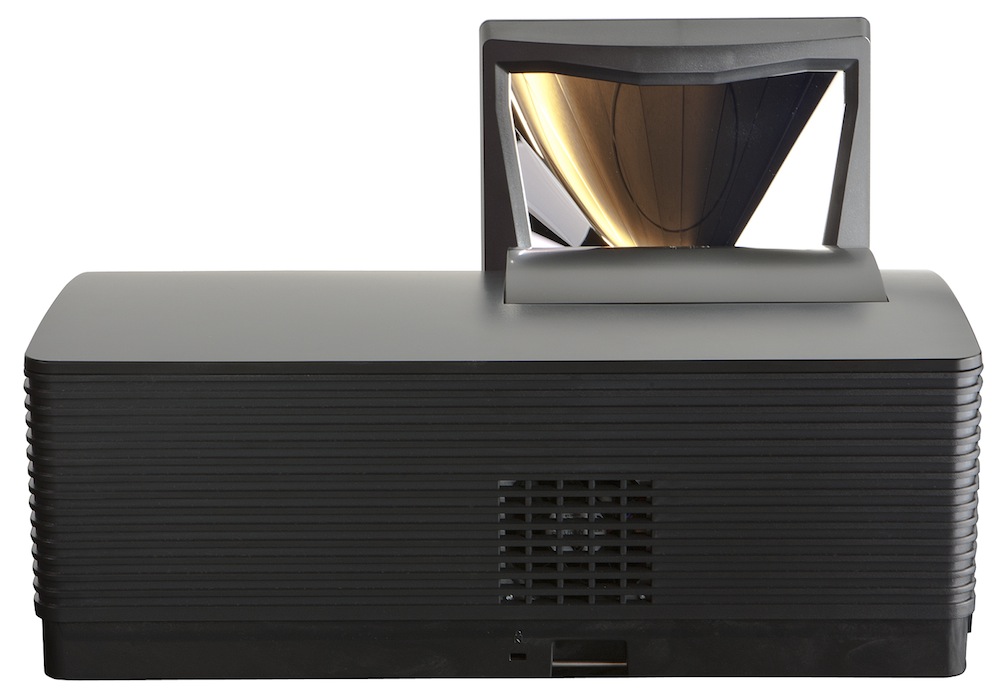
For a truly immersive home theater experience, nothing compares to a large image that fills your field of view.  Unfortunately many of us don’t have a room that will work for a projector due to space and throw limitations and are forced to make do with a far smaller plasma or LCD display.  Runco has a solution for those challenging situations with their LS-100d, a short throw, LED-based projector capable of producing a 100″ image while being placed right up against the wall.

runco_projector_side_small

Design and Setup of the Runco LightStyle LS-100d Projector

The LS-100d manages to pull off this feat with a specially designed curved mirror that takes the image off the lens and projects it onto the screen.  This design means that the LS-100d lacks any lens zoom or shift controls, as those would not be able to interact with the mirror assembly.  With this setup the LS-100d can provide an image between 84″ and 100″ in size, depending on how close you are able to place it to your screen.  Focus controls are available, but the design of the LS-100d makes all other lens controls unnecessary.

runco_projector_back_small

Providing the image is a DLP chip powered by an LED light engine.  The use of an LED engine means you won’t ever have to worry about replacing a bulb over the life of the projector, and the light output should not have a noticeable decrease over time.  It also prevents the dreaded rainbow effect that some people suffer from with DLP-based projectors.  With the recommended 1.0 gain screen, the projector is capable of close to 13 ftL of light off an 84″ screen after calibration, and close to twice that with maximum output.

runco-ls-100d-small-1

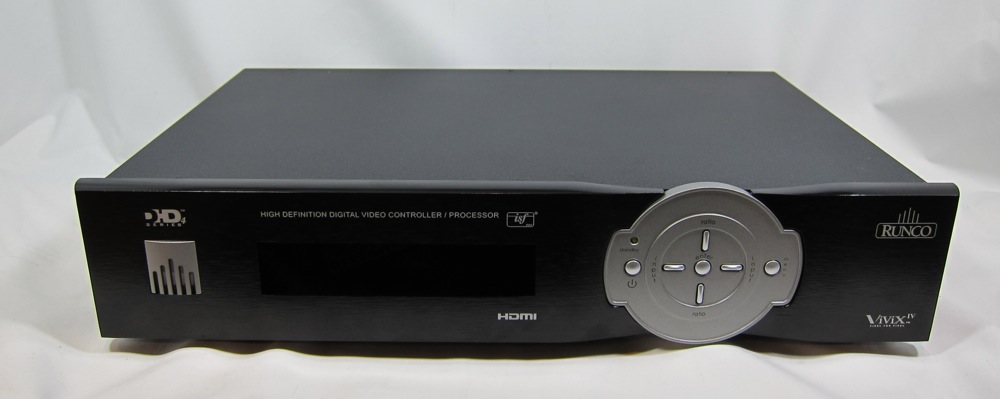
The d at the end of the LS-100d model designation indicates that the image processing controls for the LS-100d is contained in the external DHD4 controller.  The DHD4 has all of the inputs one could require with 4 HDMI, a Component, 3 Composite and 2 YPbPrHV inputs that allow for RGB or Component video.  The DHD4 also has dual HDMI outputs, allowing you to run one to the projector and one to your surround sound processor, allowing the DHD4 to handle all the video and processing.

runco-ls-100d-small-3

The DHD4 provides for full video processing, including video scaling and full ISFccc controls for custom installers.  These controls are locked out from users, but allow for ISF Day and Night modes to be setup, and these are unique to every input, allowing the LS-100d to be truly calibrated for every source component to get the best performance.  The initial settings out of the box were very far off the HDTV standards, but once the Rec 709 color gamut is selected in the calibration controls, the settings were nearly spot on without any additional adjustments.  For those that want even better controls, there are full HSL controls available for all six primary and secondary colors, as well as white balance and gamma settings.  Keeping the controls separate from the projector itself makes setup much easier, as you only need to run a pair of cables from the DHD4 to the LS-100d, making a custom install easier.

On that note, the Runco will be sold by a custom installer which will save you a lot of aggravation as the radical mirror assembly means that installation and placement is very hard to get right.  Setting it up with my screen meant getting the height and distance from the screen just right to get a 96″ 16:9 image, and then making sure it was not off-axis at all.  Any small alignment issues were very noticeable as it caused a radical shift in geometry.  As such this is a projector you will certainly want to be permanently installed with a screen and not attempt to move from room to room.


The Runco LightStyle LS-100d Projector In Use

Once positioned correctly I fired up the LS-100d and started by watching a bit of Cars 2.  As I hadn’t adjusted the CMS yet, I was amazed to see the colors that were jumping off the screen at me.  LEDs can produce a much wider color gamut than traditional bulbs, and so there were shades of red, green, and blue that I hadn’t seen on a home projector before.  It was very inaccurate, but it was also eye-popping to see that a projector could produce these colors, and really with CGI content the extra pop was nice.  After admiring the colors for a bit, I set the CMS to Rec 709 and Cars 2 looked normal again.

With the opening scene on the oilrig, blacks were a bit darker than I was used to with a DLP projector.  I’m not sure if the LEDs allow for this, or if it is that Runco uses a much higher quality glass lens instead of plastic that has less light bleed, but the letterboxing bars blended into the edge of the screen much better than usual.  Geometry issues from the mirror setup were not noticeable in regular viewing, nor were any other side effects of the mirror setup.

As you would expect with a DLP, the image was razor sharp.  CGI can be good for evaluating the sharpness, as there is no possible issue with the focus or a bad film transfer to introduce a soft image.  Cars 2 looked great, with all the details coming across.  DLPs are also fantastic with motion resolution and here it looked superb as well.  There was no smearing or blurring of the image, as the cars flew around the track in Japan and Italy, and with the LEDs also no rainbows visible.

With The Fifth Element, skin tones from Bruce Willis and Milla Jovovich were spot on without excessive reddish or sunburnt tones, but the rest of the color palette certainly popped off the screen.  The last DLP I had around was an earlier Samsung RPTV model and not an LED based projector, but I never had colors that were as accurate yet vivid as these.  On Drive, the shadow detail was rendered well, which is very important in a film as dark as this, though the nighttime aerial shots of Los Angeles lacked some of the pop that projectors with higher native contrast, instead of using an iris, can manage.  All 24p content was shown at 48 Hz, and despite my worries about the lower rate I had no issues with the image showing flicker or any other artifacts.

Watching Casino Royale, the opening scene had good, rich shadow detail and blacks that blended into the letterbox bars and edges of the screen.  Once the location moves to the Bahamas, the LS-100d can put out stunning, rich blue water tones that I think most displays would be hard pressed to match.  Even though when calibrated an LED display should look the same as a conventional display, the shade of water from the LED seemed to be a bit different.  Letterboxing bars were not visible at all, and tones that were supposed to look neutral and natural did, while the bright water and other items in the Bahamas had a ton of pop to them.

After a week, I got quite used to the LS-100d being at the front of the room, where I didn’t walk in the light path every time I stood up or moved around.  For a smaller room where it would be used, this makes it easier for your guests to move around while watching something without disturbing the image for everyone else.  It also makes it a far better solution for those who would play motion-based video games, like the Wii of Xbox Kinect, as you don’t constantly interfere with the projector.  That LED lights are able to power up and run in seconds instead of minutes, and that you don’t shorten their life by turning the projector on for 30 minutes to watch a TV show makes the LS-100d better suited to a living room than most projectors would be.

With the ability to turn the LS-100d on and off and not worry about shortening the life of the bulb, I was able to treat it more like a TV.  I’d turn it on to watch an episode of a TV show, or for 30 minutes of a movie, instead of having to ensure I had a long block of time so as not to waste my bulb hours.  This ability lets the LS-100d operate more like a TV in a living room or other common setting instead of only as a projector for when you have a lot of time to sit down and watch a full movie.  The LS-100d can easily work as a typical projector, but its design and setup allows it to also work as something more.

Conclusions About the Runco LightStyle LS-100d Projector

I’m sure some people are still thinking “$19,000 for a projector that only does a 100″ image?” but that isn’t the reason for the LS-100d to exist.  Some of us can’t fit a typical projector into our rooms.  Even if we could afford an 85″ or 103″ flat panel display it might not physically be able to get into a room or be supported by the wall.  The LS-100d lets you install a true home theater sized screen almost anywhere you want and be able to fill it as long as you have the wall space.

If you have the space for a traditional projector and don’t need the optical tricks that Runco uses with the LS-100d, they have plenty of other projectors you can look into.  If you always wanted to have that movie theater in your home, but never had the space to make it work, the LS-100d might be able to solve that for you, and put out an image that looks fantastic.  The Runco LS-100d is a wonderful product that fills a niche of the home theater market very successfully.